


Paycheck Calculator US - Pay44
4.73.65K Reviews
App Specs
- Version
- 2.2.45
- Updated On
- License
- Free
- Downloads
- 100,000+
- Developer
- EHM Tech LLC
- Categories
- Finance
- Platform
- Android
Screenshots
 Analysis by AppCompare
When a new job offer lists gross pay, I never treat that number as the amount I can safely spend. Taxes and deductions change what actually lands in my account, and guessing can make a budget feel solid right up until payday. Paycheck Calculator US - Pay44 is built for that gap: it helps turn a salary or hourly figure into an estimate of take-home pay, so I can think through a choice before it affects my monthly plans.
A calculator focused on the number that matters
The useful idea here is not complicated: start with earnings, account for relevant tax details and deductions, then look at an estimated net amount. That makes the app easier to approach than a full personal-finance suite when all I need is a paycheck estimate. It is a finance app from EHM Tech LLC, and its focused purpose is a strength if I want a quick answer rather than spending time setting up a broader budgeting system.
There is an important distinction, though. A calculator can help me plan, but it is not the same thing as a pay statement from an employer. My actual deposit can depend on payroll choices and circumstances that a quick estimate may not capture perfectly. I use the result as a planning figure, not a promise or a substitute for checking my real paystub.
How I would use it before payday
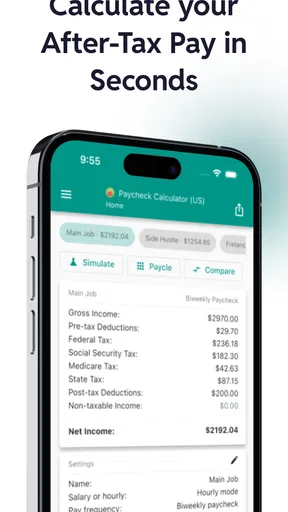
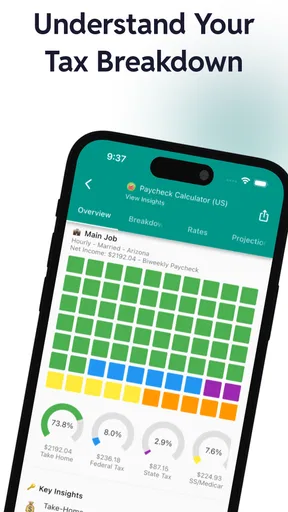
I would begin with the pay amount and schedule I expect, then enter the tax and deduction details that apply to me. The app’s appeal is that I can adjust inputs rather than accept a single generic result. When the summary separates federal taxes, state taxes, and additional withholdings, I can see why the take-home estimate differs from gross pay instead of treating the gap as a mystery.
A practical tip is to change only one input at a time when comparing options. If I am weighing a different salary and a larger retirement contribution at once, the result may be useful but it will not show me which change made the difference. I would first compare the pay figures with deductions held steady, then adjust the contribution separately. That small habit turns a rough calculator into a more useful decision aid.
Why scenario testing can change a decision
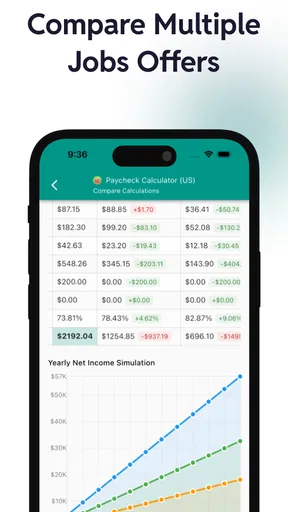
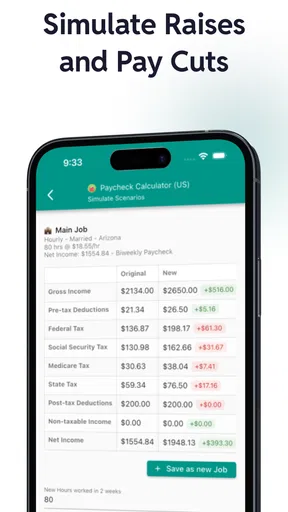
Scenario testing is the capability I find most valuable. Say I receive an offer with a higher annual salary but expect more commuting costs, or I am considering raising a workplace contribution. I can model the paycheck effect before deciding whether the change fits my budget. It does not answer every question about a job, but it helps me compare the cash-flow side with more care than simply comparing headline salaries.
For an hourly worker, the same approach can help when hours vary. I can estimate a typical week and then test a busier or quieter one, as long as I enter the figures that reflect the situation I want to examine. The result is most useful as a range of possibilities, not a guarantee that every pay period will match the estimate.
Worth Reading Before You Choose

EA SPORTS FC Mobile 26 Is a Bigger Football Game, but It Takes Time

Flipboard Shows What News Apps Must Do Beyond the Feed

Switching to Android Auto Means Rethinking Your Driving Routine

Google Calendar Makes a Crowded Week Easier to Manage

Ludo King Makes the Most of the Minutes Between Plans

Baby Panda World Brings Quick Play to Modern Phones, but Its Game Library Feels Busy
Custom deductions make the estimate more personal
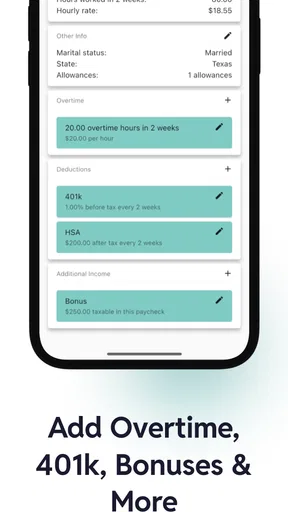
The option to add custom deductions matters because two people earning the same gross amount may take home different sums. A health premium or union dues, for example, can change the number available for rent and groceries. Including relevant deductions gives me a more grounded comparison than a bare salary calculation.
I would still check how a deduction is treated before relying on the result. Some payroll items affect taxable wages differently from others, and entering an amount in the wrong way can make an estimate less useful. The best workflow is to compare the calculator’s categories with a recent paystub, where available, and use the app to explore changes rather than assume every custom entry maps perfectly to payroll rules.
What the summary helps me notice
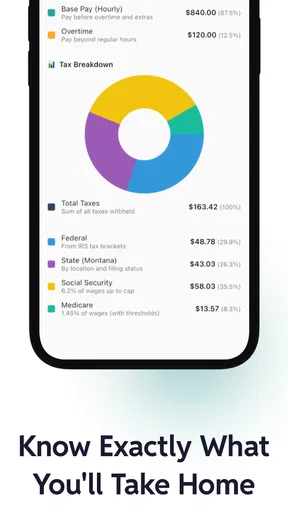
A breakdown is more useful than a single net-pay figure when I am trying to understand where money goes. Seeing taxes and extra withholdings separately can help me spot which parts are fixed by the details I entered and which ones I may want to review. If a result looks surprising, I would revisit the filing status, state, pay frequency, and deductions before changing my budget around it.
This is also where I would avoid false precision. A tidy screen can make an estimate feel exact, but real payroll depends on the accuracy of the inputs and the applicable rules. I treat the total as a close planning aid only when my entries reflect my circumstances, and I confirm important decisions against employer payroll information or a qualified tax professional when needed.
Where it fits among money tools
Compared with doing the arithmetic by hand, a dedicated paycheck calculator is quicker to revise and easier to use for side-by-side scenarios. A general budgeting app is better once I want to track spending across accounts or manage bills over time; that is a different job. Pay44 sits between those approaches: it helps answer “what might my take-home pay be?” without asking me to turn the task into a full budget setup.
That focus also sets a boundary. I would not choose it as my only tool for tax filing, detailed annual tax planning, or tracking household spending. For those needs, an official payroll source, tax software, or a budgeting tool may be more appropriate. The calculator earns its place when the decision is specifically about the paycheck and I want to test a few reasonable inputs.
Everyday use and the people it suits
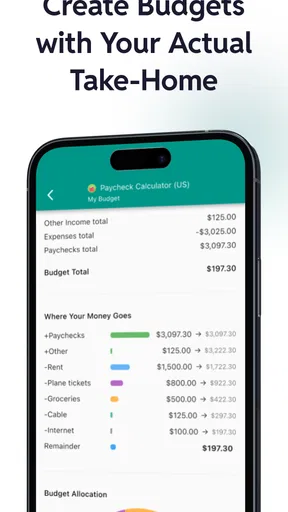
Imagine I am deciding whether a new apartment fits after a change in hours. I can enter the expected pay, include deductions I know about, and compare a lower-hours week with a typical one before committing to a rent figure. The point is not to predict every deposit down to the cent; it is to catch an uncomfortable gap between gross income and spendable pay while there is still time to adjust the plan.
I think it will suit employees comparing offers, hourly workers estimating variable schedules, and anyone who wants to understand how a deduction affects take-home pay. It is less compelling for someone whose pay is highly unusual or whose payroll includes complicated benefits and adjustments, unless they are comfortable treating the result as a rough estimate. If I need an authoritative answer for a specific pay period, I would use my employer’s payroll documents instead.
The app is free to install and is rated for Everyone. It has a 4.7 average from around 10,000 ratings, with more than 100,000 installs. Those figures suggest that paycheck estimation has broad appeal, but they do not remove the need to enter accurate details. In-app purchases range from $1.49 to $39.99 per item, so I would check the purchase screen before choosing anything beyond the free use I need.
The Basics of Paycheck Calculation
So, what’s the deal with Paycheck Calculator US - Pay44? At its core, this app is designed to help you calculate your net pay after accounting for all the usual suspects like taxes, deductions, and contributions. The interface is pretty intuitive, which is a relief because, let’s be honest, math is not everyone’s best friend.
Easy to Use Interface
First off, let’s talk about the interface. It’s clean, straightforward, and doesn’t overwhelm you with too many options. You start by entering your gross pay, and then you can add information like your filing status, state, and any additional deductions you might have. The app takes care of the rest.
One of my favorite things is how the app breaks everything down for you. You get a nice little summary showing federal taxes, state taxes, and any additional withholdings. It’s all laid out in a way that makes sense, even if you’re not a numbers person.
Multiple Scenarios
If you’re like me and like to play around with numbers, you’ll appreciate the ability to test different scenarios. Maybe you’re considering a job offer and want to know what your take-home pay would be. Or perhaps you’re thinking about increasing your 401(k) contributions. You can tweak the numbers and see how each change affects your bottom line.
This feature is super handy for planning and budgeting. Plus, it gives you a clearer picture of how your financial decisions affect your paycheck, which is something I found really empowering.
Customizable Deductions
Another cool feature is the ability to add custom deductions. Whether it’s health insurance premiums or union dues, you can include these in your calculations. This level of customization is where the app really shines, in my opinion. It’s not just a one-size-fits-all calculator; it’s tailored to fit your unique situation.
Real-Time Updates
One thing I noticed, which I think is a game-changer, is the app’s ability to provide real-time updates. Tax laws change, and so do your financial circumstances. Having an app that keeps up with these changes is crucial. With Paycheck Calculator US - Pay44, you can rest easy knowing you’re getting the most accurate information possible.
Security and Privacy
Now, I know what you’re thinking—what about security? It’s a valid concern, especially when you’re dealing with sensitive financial information. The app uses encryption to keep your data safe, which put my mind at ease. No one wants to worry about their information getting into the wrong hands.
And speaking of privacy, the app doesn’t require you to create an account or log in, which is a huge plus in my book. You get to keep your calculations private and secure.
Final Thoughts
In conclusion, Paycheck Calculator US - Pay44 is a solid app that does exactly what it promises. It makes understanding your paycheck straightforward and stress-free. Whether you’re trying to manage your finances better or just curious about how much you’ll take home, this app has got you covered.
Overall, I’d say it’s a handy tool to have, especially in today’s fast-paced world where every penny counts. So if you’re looking for a reliable way to calculate your paycheck, give this app a shot. You might just find it’s the financial assistant you never knew you needed!
Pros
- Easy-to-use interface simplifies calculations.
- Supports various tax deductions accurately.
- Quick updates for tax law changes.
- Includes overtime and bonus calculations.
- Offers detailed breakdown of net pay.
Cons
- Limited to US payroll calculations only.
- No integration with payroll software.
- Lacks multi-language support.
- Requires internet for tax updates.
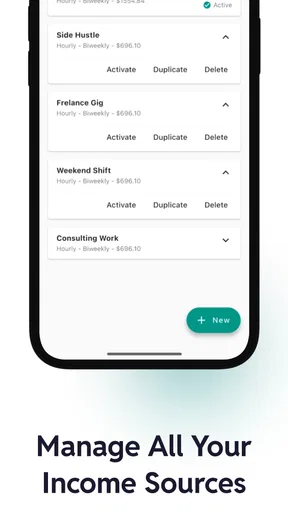
- No option to save multiple profiles.
FAQs for Paycheck Calculator US - Pay44
What is Paycheck Calculator US - Pay44?
Paycheck Calculator US - Pay44 is an app designed to help users accurately calculate their take-home pay by factoring in various deductions such as taxes, insurance, and retirement contributions. It is particularly useful for employees in the United States who want to understand their net earnings after all deductions.
Is Paycheck Calculator US - Pay44 free to use?
Yes, Paycheck Calculator US - Pay44 offers a free version with essential features for calculating your paycheck. However, there may be in-app purchases or a premium version available that provides additional features like advanced tax settings, multiple state calculations, or no ads.
How accurate are the calculations provided by Paycheck Calculator US - Pay44?
The app is designed to provide highly accurate calculations based on current federal and state tax rates. However, users should ensure they input the correct data regarding their salary, deductions, and tax withholdings to ensure the accuracy of the resulting paycheck calculations. Regular updates help maintain accuracy with changing tax laws.
Can I use Paycheck Calculator US - Pay44 for multiple states?
Yes, Paycheck Calculator US - Pay44 supports calculations for multiple states, making it convenient for individuals who work across state lines or have moved. Users can switch between state settings and customize their inputs to reflect different state tax requirements and other regional deductions.
Is my personal data safe with Paycheck Calculator US - Pay44?
Paycheck Calculator US - Pay44 prioritizes user privacy and employs encryption to protect personal data. It does not require sensitive personal information beyond what is necessary for accurate calculations. Users are encouraged to review the app’s privacy policy to understand how their data is handled and protected.


